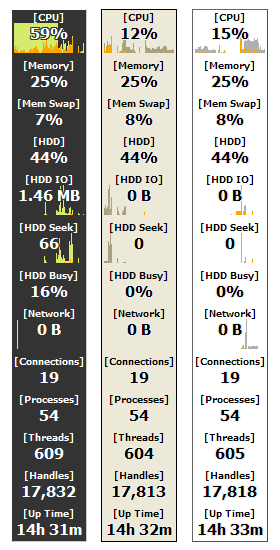
| Controlla le Prestazioni del Tuo PC Moo0 Monitor di Sistema ti permette di sorvegliare l'uso delle risorse di sistema del tuo PC. Supporta, al momento, 43 tipi di informazioni tra cui: CPU, Memoria, Rete e l'uso dettagliato del HDD. Utilizzando questo programma potrai scoprire cosa limita le prestazioni del tuo sistema quando ciò si verifica. Consigli: Un'idea sulle Skin? - Guardale tutte qui - Puoi restringere la visualizzazione cliccandola due volte. - Puoi, inoltre, ridimensionarla attraverso lo scrolling con il Tasto Centrale del mouse. - Puoi sospendere la funzione Nascondi-Automaticamente pressando il tasto Shift.
Articoli:
Il supporto Russo (Revisione) è stato possibile con il contributo di Max. Grazie di cuore! | |||||||||||||
| Titolo pagina: | ||||||||||||||
| URL pagina: | ||||||||||||||
| HTML Tag: | ||||||||||||||
| Lingua: | Bielorusso, Bulgarian, Brasiliano Portoghese, Cinese (Simplificato), Cinese (Tradizionale), Ceco, Danese, Olandese, Inglese, Francese, Tedesco, Greek, Ungherese, Italiano, Giapponese, Koreano, Polish, Russo, Serbian (Cyrillic), Serbian (Latin), Spagnolo, Swedish, Turco, 16 other languages (Partial) - [ Traduttori (45) ] | |||||||||||||
| SO: | Windows XP/Vista/7/8.1/10 | Facilità d'uso: | Facile | |||||||||||
| Versione: | 1.83 | |||||||||||||
| Ultimo aggiornamento: | 2019/06/15 [ Cronologia aggiornamenti (64) ] | |||||||||||||
| File PAD: | [ se gestisci un sito con elenchi di software... ] | |||||||||||||
| Download: |
| |||||||||||||
| Dimensione: | 4.67 MB | |||||||||||||
| Licenza: | Gratuito (Soltanto per uso Non-Commerciale) Lo usi sul Luogo di Lavoro / Internet Cafe?
| |||||||||||||
| Commenti: | ||||||||||||||
| FAQ: | ■ (Symptom) The program suddenly doesn't start up one day? stopped working properly? on Windows 10/8.1? This probably happens when "Windows SmartScreen" hinders our program from working. In this case, please try the following before the installation. 1. Before the installation, right-click on the installer file and open the file "Property". 2. At the bottom of "General" tab, if you see "Security: This file came from another computer...", select "Unblock" check box, and "Apply" and "OK". 3. If you install the program after it, it may be able to prevent many problems caused by "Windows SmartScreen" or some other security products. Or, you can actually turn off this problematic feature of Windows itself: (only if you feel too troublesome to do this every single time.) https://ugetfix.com/ask/how-to-disable-windows-smartscreen/ This happens to every software vendor who doesn't or can't donate $300 to Microsoft every single year (EV signature purchase), and especially when the program file is still new. This kind of problems started to get reported since the early of 2019. (Symptom) Error message: "Unknown locale of Windows" / Some field values always stay as 0. / It freezes. / It takes long time to start up. Please generate an error report file through "About -> Generate Error Report File.." menu and check the lines under [Performance Counter Objects]. If there is any data under it, please send the file to us. We can support your system using the information. If there is nothing under it, it means your performance monitoring mechanism has been corrupted by some other programs. (It is well known that many old programs keep breaking the mechanism.) In the case it's been broken, you may try to fix it as referred here: How to manually rebuild Performance Counter Library values (Symptom) "CPU Temperature" field always shows "-----". The CPU temperature field currently supports recent Intel and AMD processors only. If your CPU temperature field is always "-----", please try one of "Temp1-3" fields. Which changes most actively is usually CPU temperature. Also, if your CPU is very recent, but "CPU Temperature" fields doesn't work, please generate an error report file through "About -> Generate Error Report File.." and send it to us. We'll see what we can do. (Symptom) It uses lots of CPU on Windows 7 running on Virtual PC. It's because Virtual PC doesn't support hosting Windows 7 yet. Even if you turn off SystemMonitor, Windows Task Manger will then use lots of CPU instead. You simply need to wait for Virtual PC to support Winwdows 7. (VMware has no problem of such.) | |||||||||||||
| Articoli: |
Japanese) 「Moo0 システムモニター」 - 好みのスキン、サイズ、レイアウトにより、CPU使用率、CPU温度、HDD温度、起動時間などのシステム情報を表示できる自由度の高いデスクトップソフト (フリーソフト100)
Japanese) Moo0 システムモニター 1.32 - システムリソースの使用度を一覧で確認できる、視認性のよいシステムモニタ (Vector) Moo0 SystemMonitor Keeps an Eye on Your System Resources (Lifehacker) | |||||||||||||
 System Performance Monitor